What is this?
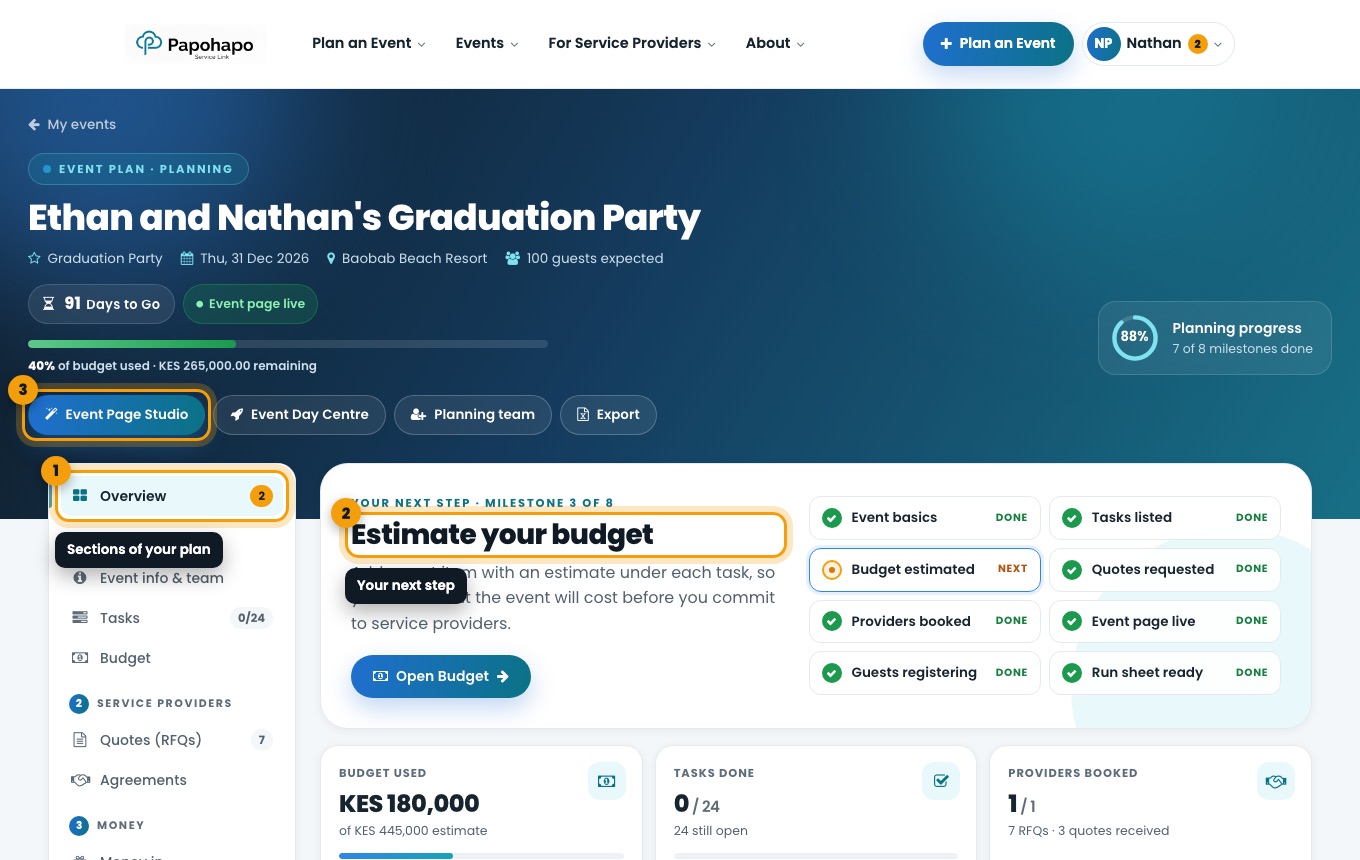
Your event plan is organised into the order you will work through it: 1 Plan, 2 Service providers, 3 Money and 4 Guests, plus your Event day tools.
Why it matters
Following the steps in order is the fastest way to a well-planned event, and the progress ring shows how far along you are.
How to do it
Start on Overview
Overview shows Your next step, eight planning milestones and key numbers: budget used, tasks done, providers booked, guests registered and money received.
The Overview tab with your next step and milestones. Use the left-hand sections
Plan: Event info & team, Tasks, Budget. Service providers: Quotes (RFQs), Agreements. Money: Money in, Payments. Guests: Event page, Guests, Gift selection. Event day: Event Day Centre, Seating planner, Door check-in.
Use the header buttons
Event Page Studio designs your guest page, Event Day Centre runs the day itself, Planning team invites helpers and Export downloads your plan.
On a phone, the sections appear as a menu that stays at the top as you scroll.