Skip to Content
Free The event planner for organisers in Kenya

Plan your event. Manage everything. Enjoy the moment.

Papohapo gives you one workspace for your whole event. Build the budget, organise tasks, book trusted service providers, track payments, welcome guests on your own event page and run the day itself, from the first idea to the last guest at the door.

  • Free for organisers
  • No card needed
  • Your Event Plan in minutes

Already using Papohapo? Open my Event Plan

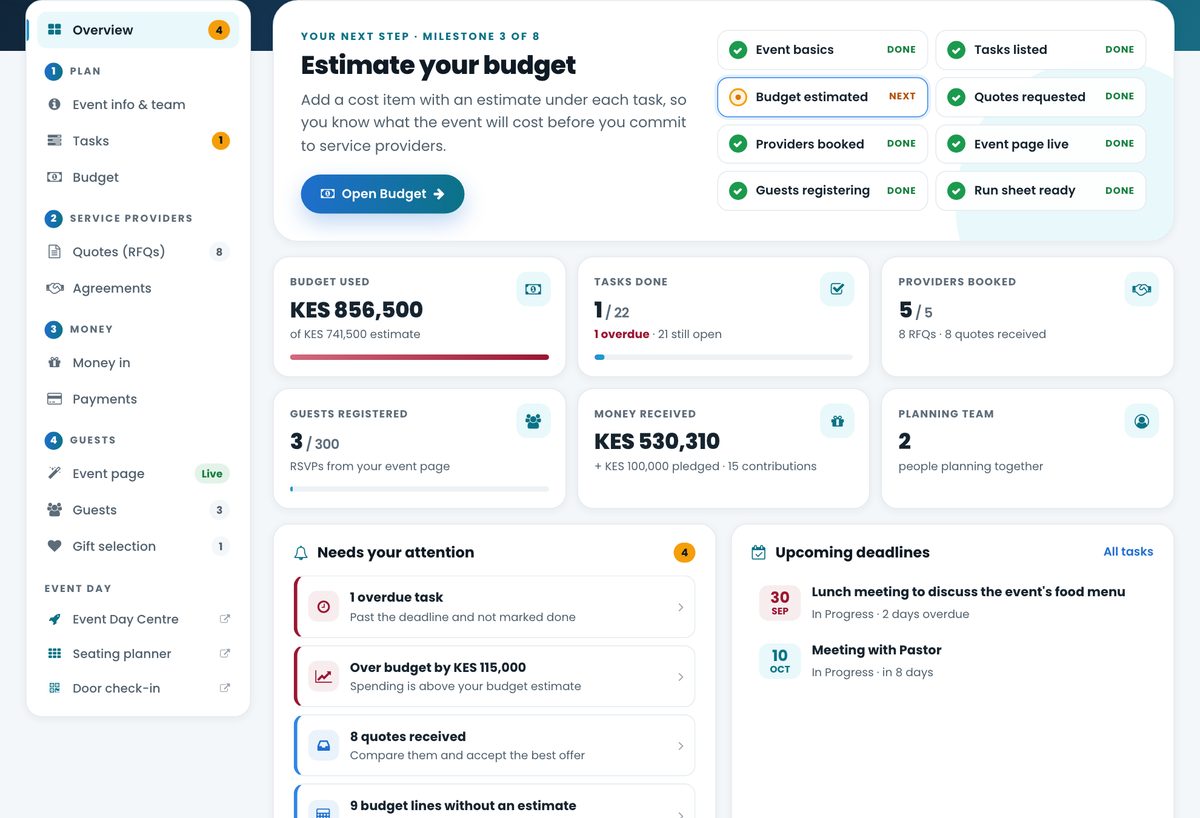
Papohapo Event Plan overview showing budget used, tasks done, providers booked, guests registered, money received and items that need attention
New quote receivedCompare it with the others
Agreement signedBoth parties · locked
Guest checked inTable 3 · Seat 5
One platform, every stage of your eventOne connected journey. One Event Plan.
  1. Idea
  2. Plan
  3. Budget
  4. Find
  5. Quote
  6. Agree
  7. Pay
  8. Invite
  9. Seat
  10. Check in
  11. Celebrate

The heart of Papohapo

Meet your event command centre

Every event gets its own Event Plan. Budget, tasks, providers, money, guests and the day itself, organised in one place and kept up to date as things happen.

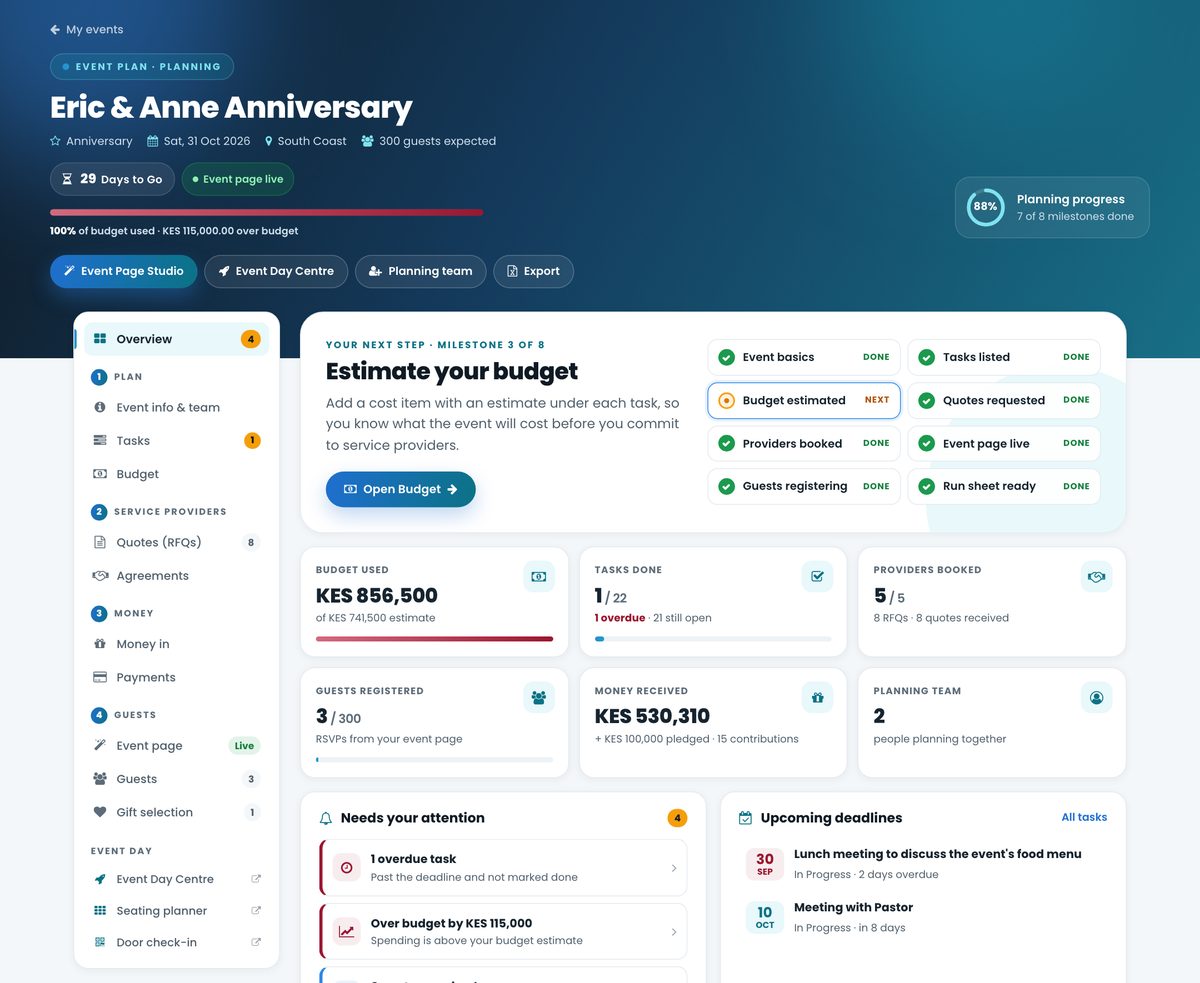
An Event Plan overview: budget, tasks, providers, guests, money received, planning team and a list of things that need attention
  1. 1
    BudgetKnow what you expect to spend.
  2. 2
    TasksKnow what needs to happen next.
  3. 3
    ProvidersKnow who you're working with.
  4. 4
    MoneyKnow what's been received and paid.
  5. 5
    GuestsKnow who is coming.
  6. 6
    Event pageA beautiful page for your guests.
  7. 7
    Event daySeating, check-in and the run sheet.
  8. 8
    Needs your attentionWhat to deal with first.

How it works

From first idea to event day

Follow your event through Papohapo the way you would plan it, one step after another, with every step saved in the same Event Plan.

01Create your event

Tell Papohapo what you're planning

Pick the occasion, date, place and expected guests, and choose the services you think you'll need. Papohapo creates your Event Plan with the tasks and budget lines to match, so you start with a plan instead of a blank page.

  • Occasion
  • Date
  • Location
  • Guests
02Organise your plan

Turn ideas into a plan you can act on

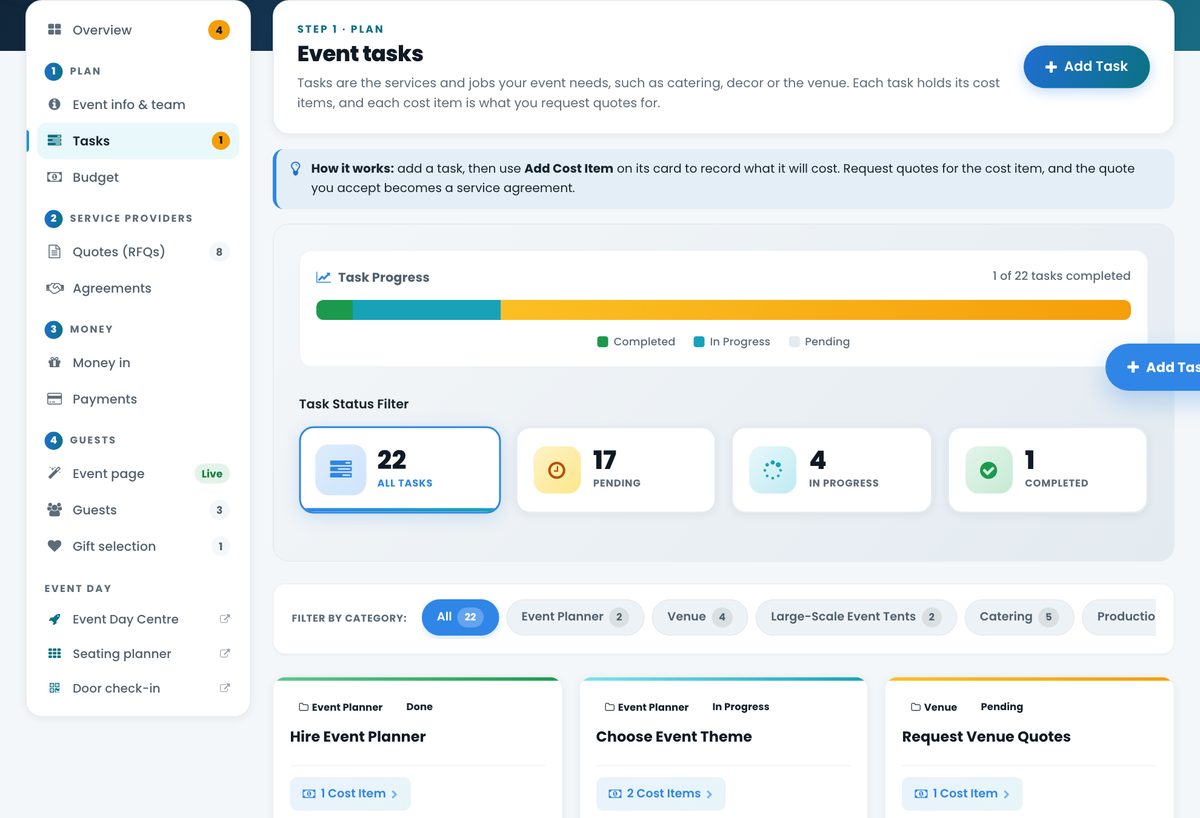
Every service becomes a task with a stage and a deadline, and every task links to the cost items behind it. See at a glance what's pending, in progress and done.

  • Tasks
  • Deadlines
  • Responsibilities
  • Notes
  • Planning team
Event tasks with progress bar and pending, in progress and completed counts
03Build your budget

Know what your event could cost before you commit

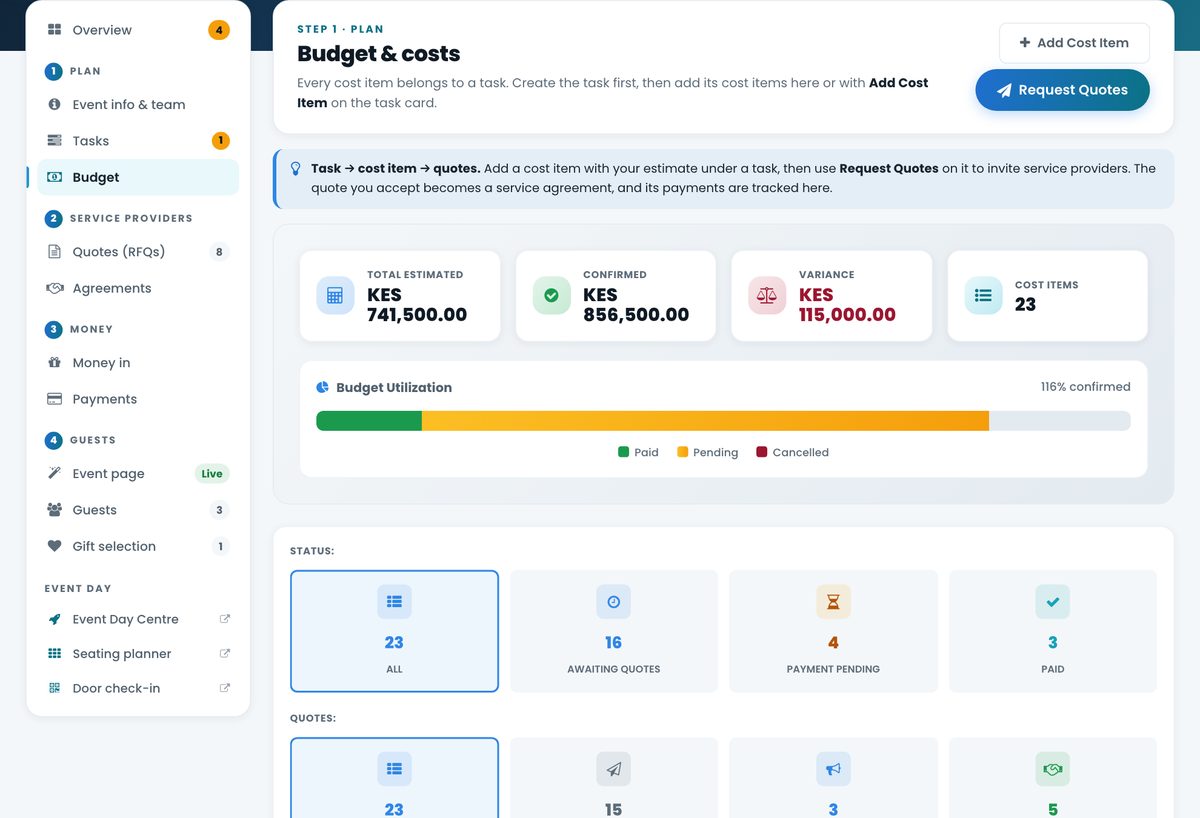
Add an estimate to each cost item. Accepted quotes become confirmed costs, payments are tracked against them, and Papohapo tells you when spending runs above your estimate.

  • Estimated
  • Quoted
  • Confirmed
  • Paid
  • Outstanding
Event budget with total estimated, confirmed and variance, and a budget utilisation bar
04Find the right providers

Discover 169 event services and the people who provide them

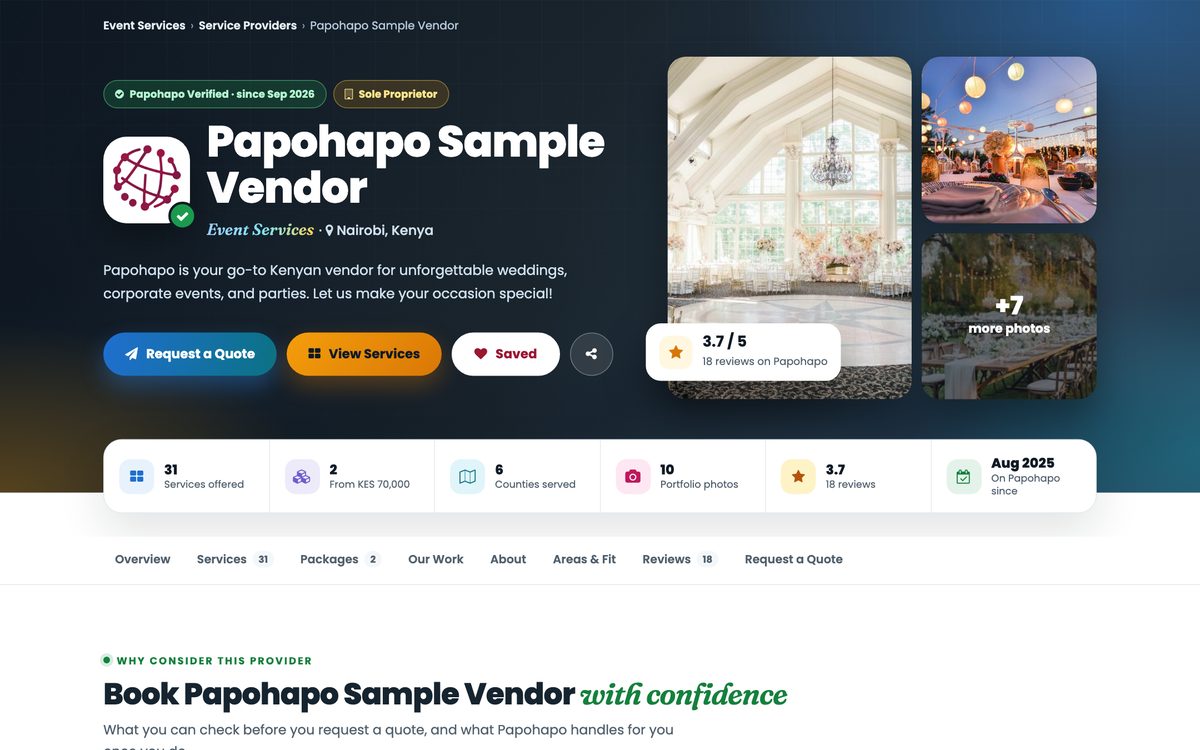
Browse services and ready-made packages, read provider profiles with photos of their work, reviews and areas served, and look for the Papohapo Verified badge.

  • Catering
  • Décor
  • Photo & video
  • DJs & sound
  • Tents
  • Entertainment
  • Venues
  • Transport
  • Security
  • And more
Explore Event Services
A service provider profile with verification badge, rating, services and photos of their work
05Request & compare quotes

One request. Several quotes. One clear choice.

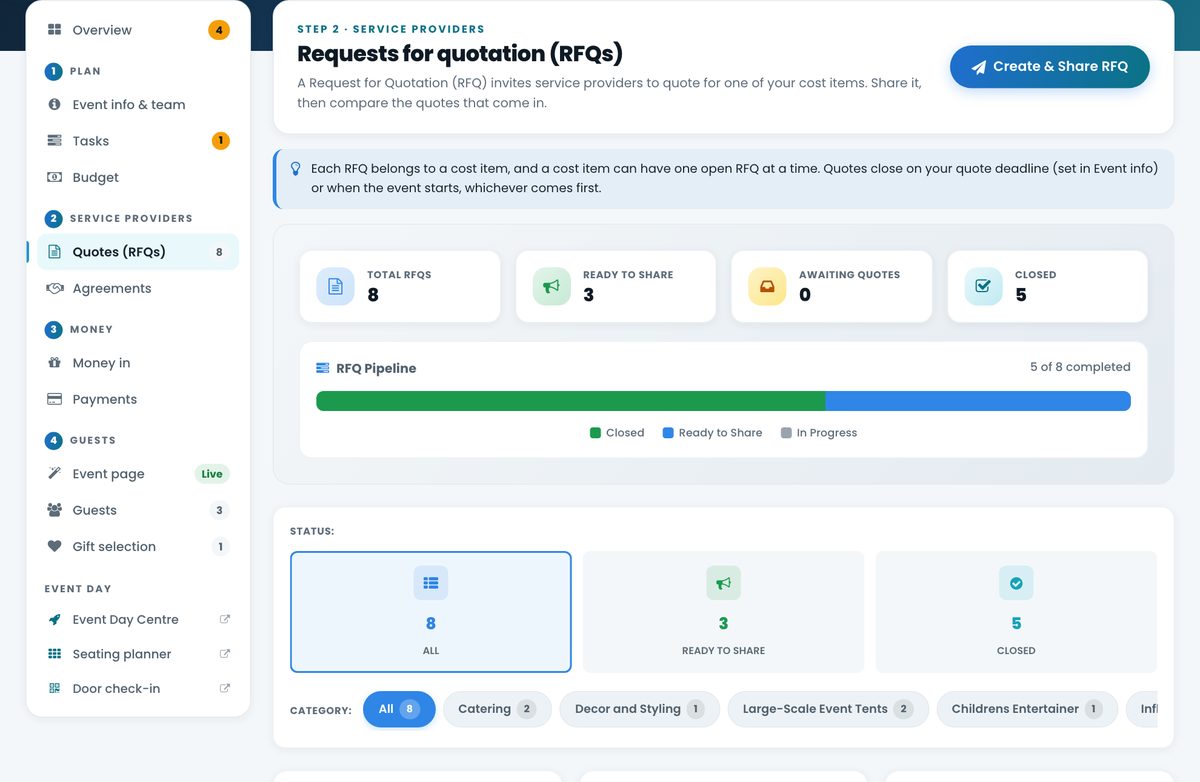
Turn any cost item into a request for quotation. Matching providers send written quotes before your deadline, and you compare them side by side before you accept the best one.

RequestReceiveCompareShortlistSelect
Requests for quotation with the RFQ pipeline: ready to share, awaiting quotes and closed
06Agree with your providers

From accepted quote to signed agreement

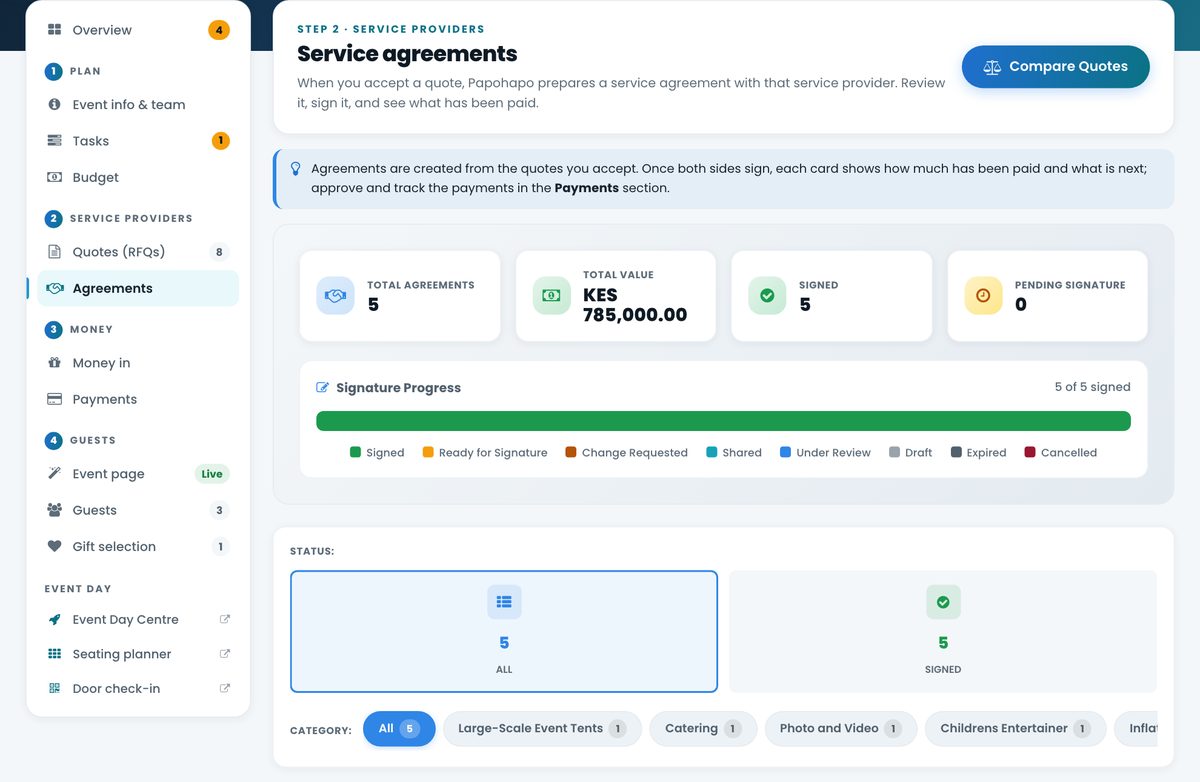
The quote you accept becomes a service agreement with the services, dates and payment terms written down. Both sides sign online, and the agreement is locked once signed.

QuoteAgreementDigital signaturesConfirmed
Service agreements with total value, signed count and signature progress
07Manage payments

See what's paid and what's still to pay

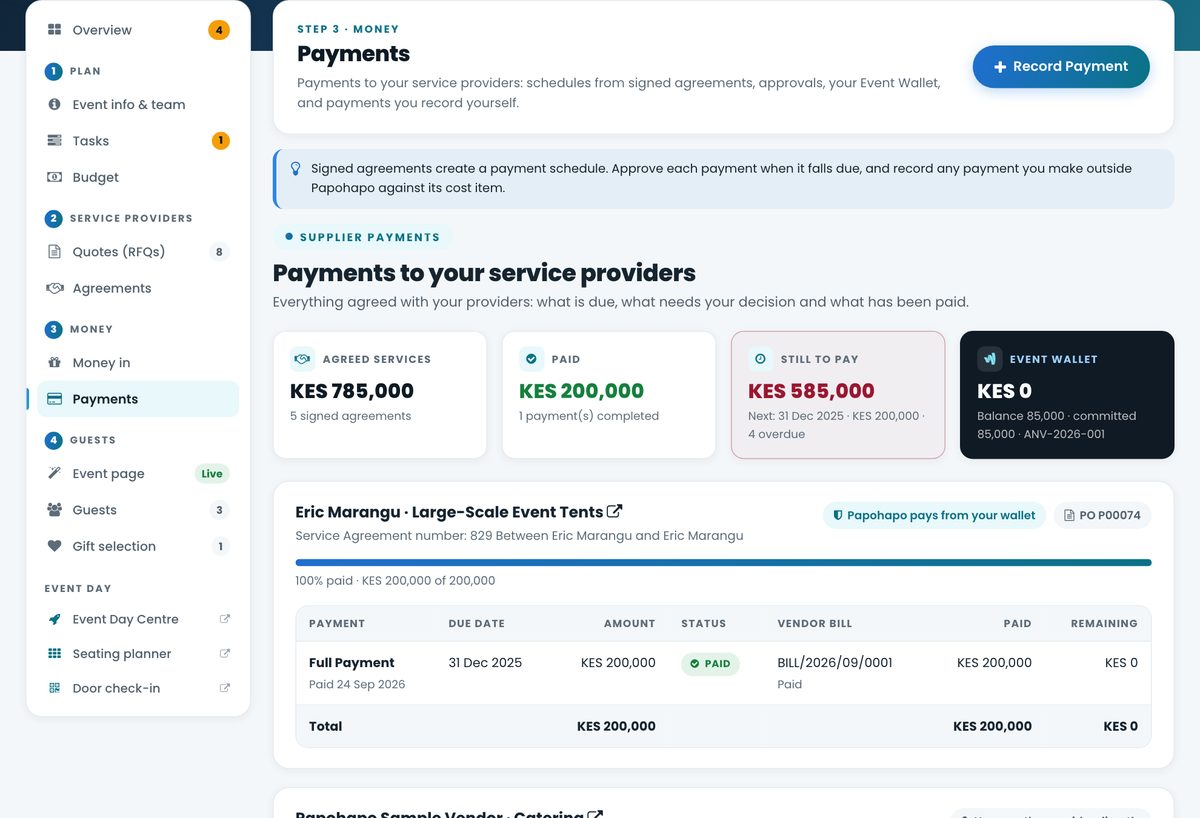
Each signed agreement brings its payment schedule into your plan. Approve payments as they fall due, record what you've paid and always know the balance remaining with each provider.

DepositMilestonesBalanceCompleted
  • Payment schedules
  • Reminders
  • Contributions
  • Paid vs remaining
Payments to service providers: agreed, paid and still to pay, with each provider's payment schedule

Event Page Studio

Give your event its own beautiful website

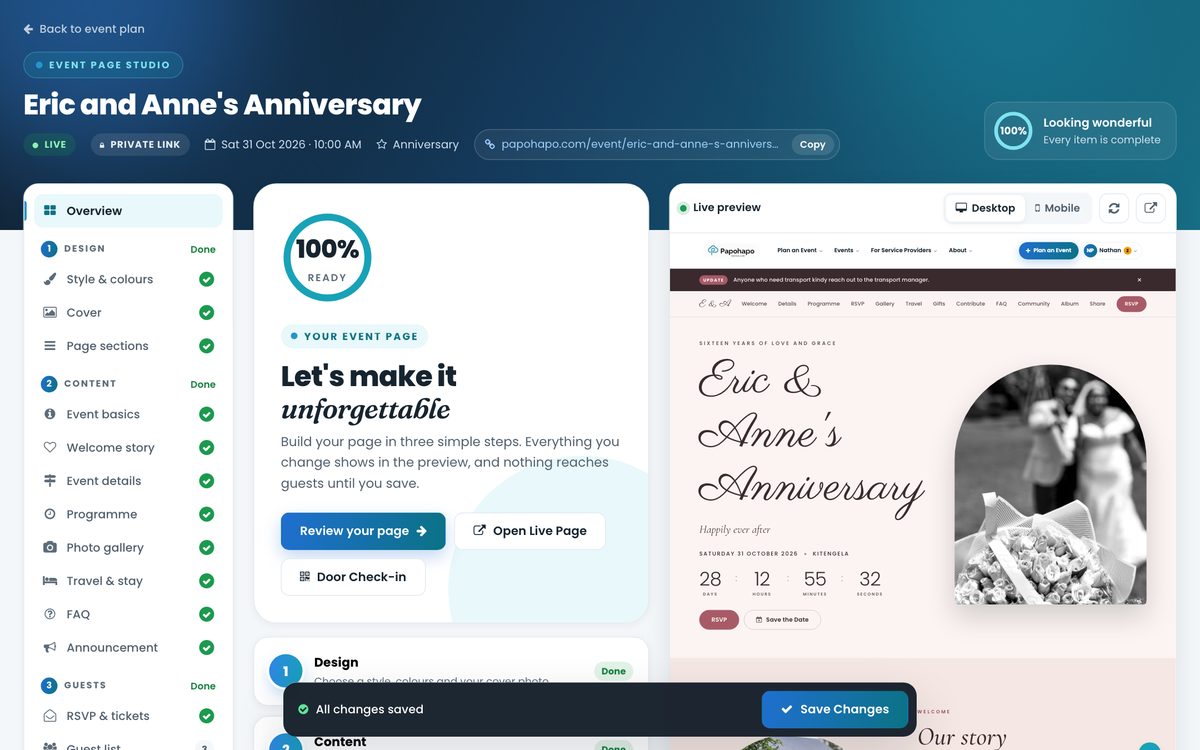
Design a page your guests will love in a few simple steps. Choose a style, tell your story and share one link with everything guests need to know.

  • Your story and photos
  • Programme and countdown
  • Venue and directions
  • Travel and stay tips
  • RSVP and QR entry passes
  • Gift registry
  • Guest announcements
  • Public or private link
Event Page Studio with section checklist and a live preview of the event page
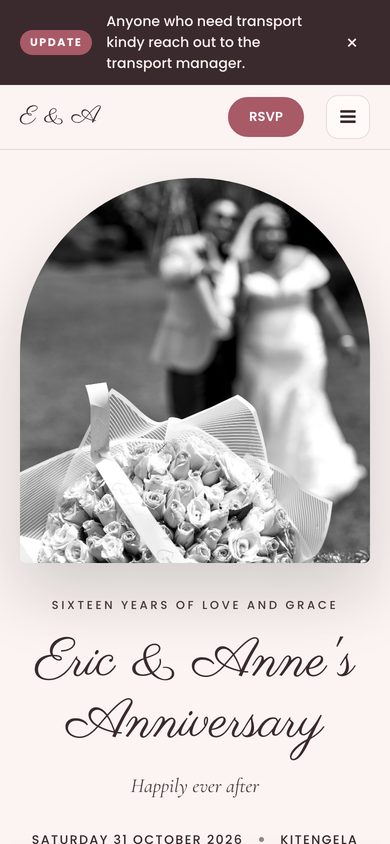
The finished event page on a phone

Guests

Know who is coming

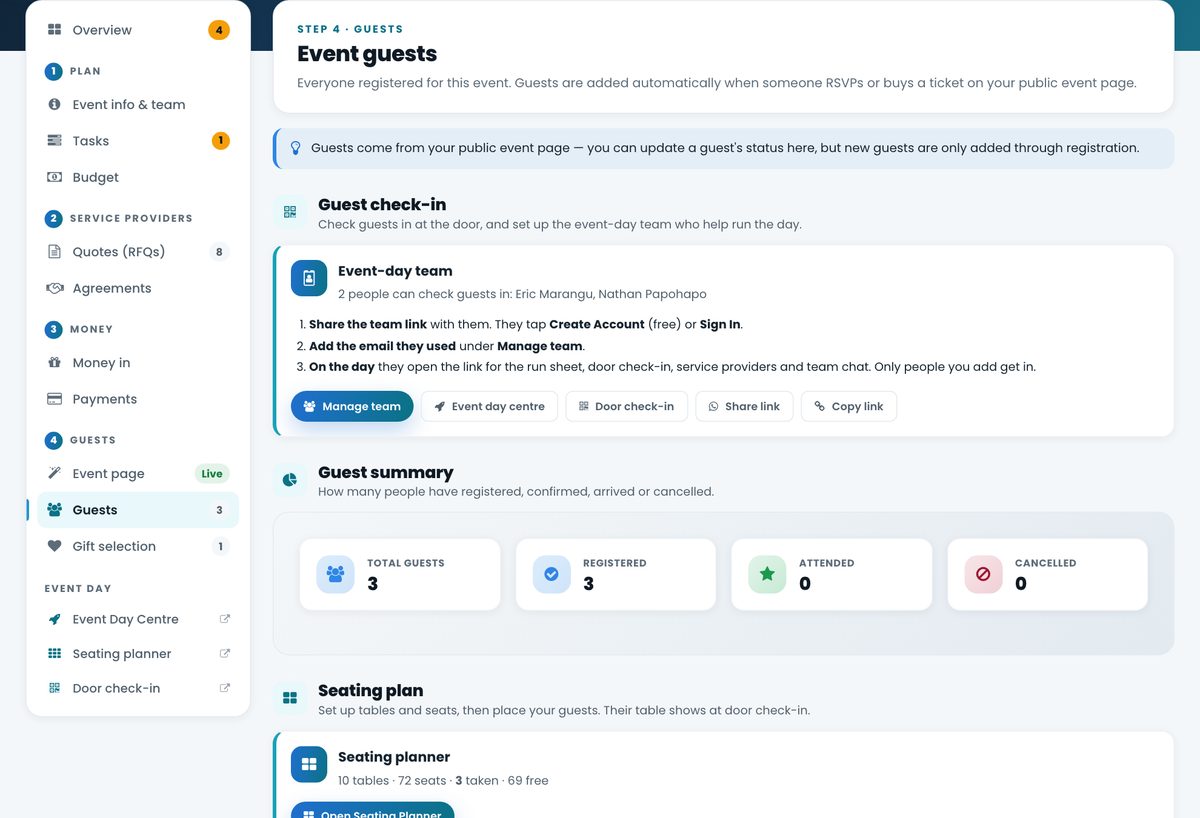
Guests RSVP on your event page and appear in your Event Plan automatically, with their party size, entry pass and seat, so the guest list you plan with is the one used at the door.

Event pageRSVPGuest listSeatingCheck-in
  • Guest list and RSVP status
  • Confirmed, attended and cancelled
  • Party sizes from RSVP answers
  • Guest numbers against capacity
Event guests with guest check-in, event-day team and guest summary

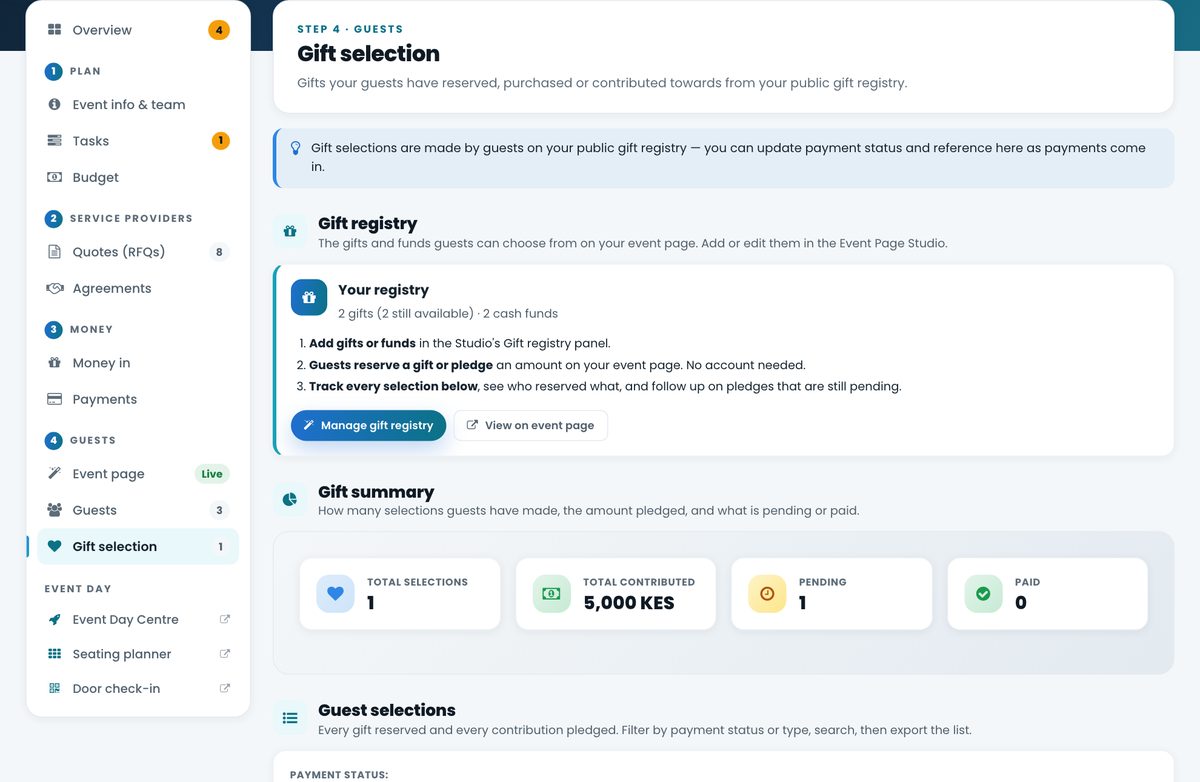
Gifts & contributions

Make giving easy and warm

Share a gift registry on your event page. Guests choose a gift or contribute to a cash fund, and every selection lands in your plan so you can follow up and say thank you.

  • Gifts and cash funds
  • Guests reserve or pledge
  • Selections tracked in your plan
  • Family contributions in Money In
Gift selection: the gift registry and a summary of selections, contributions and payments

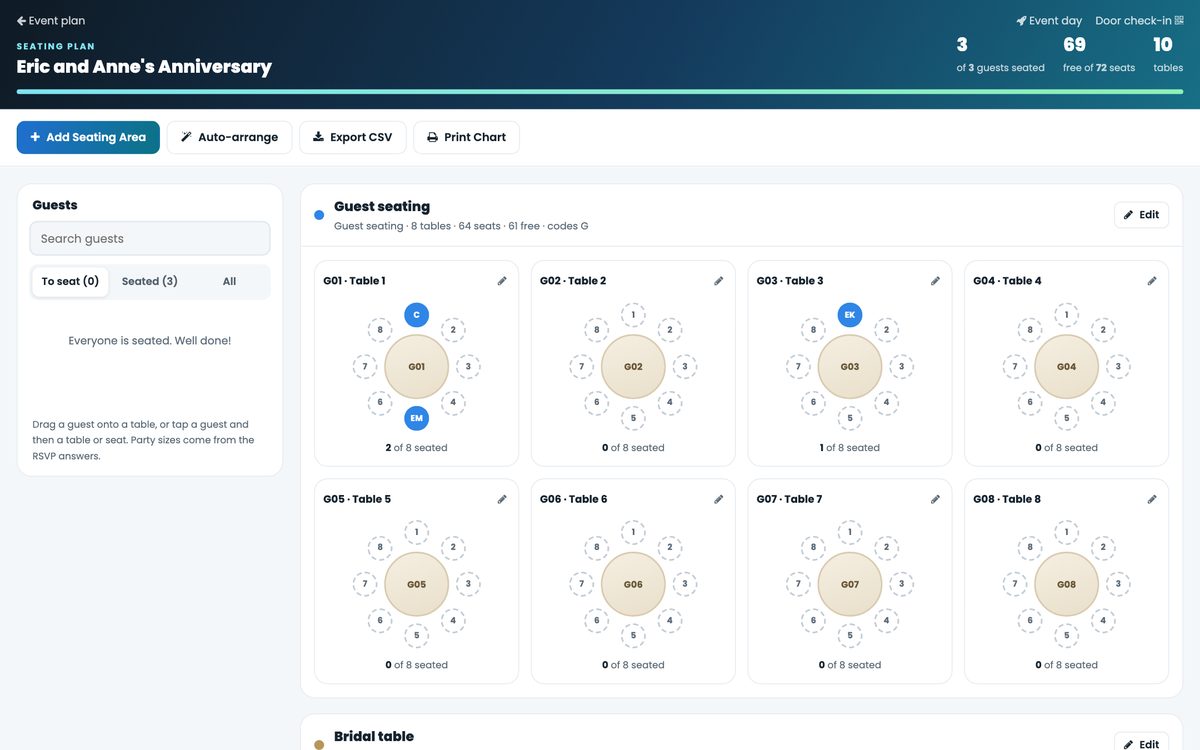
Seating Planner

Know where everyone sits

Solve the seating puzzle before the big day, not while guests are arriving. Set up areas and tables, then drag guests to their seats or let auto-arrange keep parties together.

  • Areas: guests, family, VIP, bridal
  • Round and long tables
  • Drag and drop, or tap on a phone
  • Auto-arrange by party
  • Print the chart or export CSV
  • Seats shown at check-in
Seating Planner with round tables, seats and guests to seat

Event day

When event day arrives, you're ready

Papohapo doesn't stop at planning. Your event-day team gets the tools to welcome guests, follow the run sheet and keep providers on track.

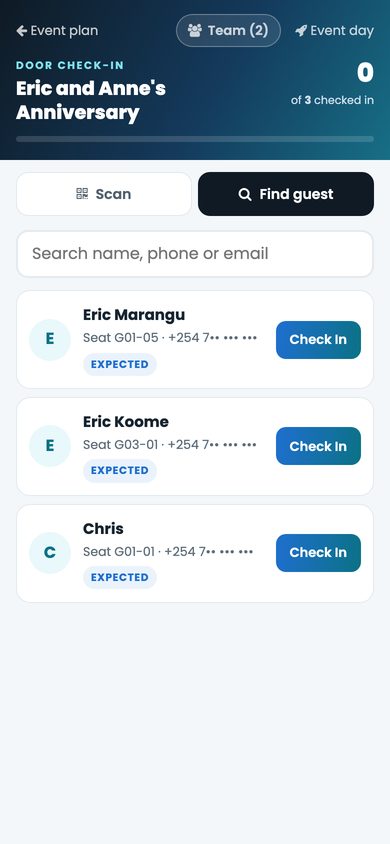
Door check-in

Door check-in on a phone: find a guest and check them in, with their table and seat

Scan QR entry passes or find guests by name, and see their table and seat as they arrive.

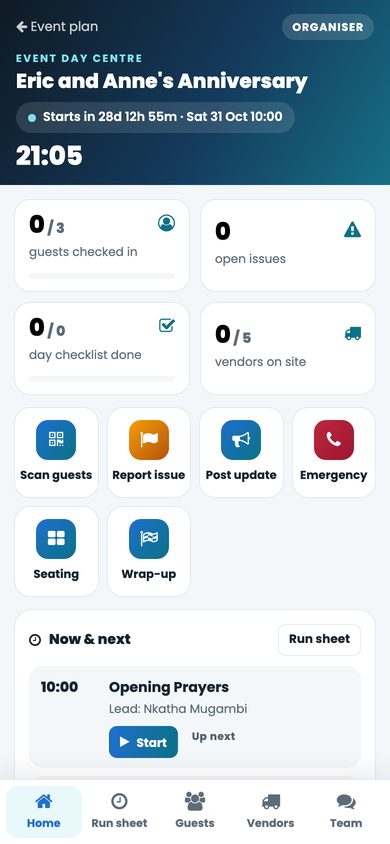
Event Day Centre

Event Day Centre on a phone: guests checked in, open issues, checklists, vendors on site and the run sheet

Your command centre on the day, on every team member's phone.

Everything in one place

  • Run sheet with now and next
  • Guest arrivals as they happen
  • Provider arrivals and set-up
  • Issues reported and resolved
  • Announcements to guests and team
  • Emergency and key contacts
  • Day-of and wrap-up checklists
  • Team chat
Seating chart ready for the day

Planning team

You don't have to plan alone

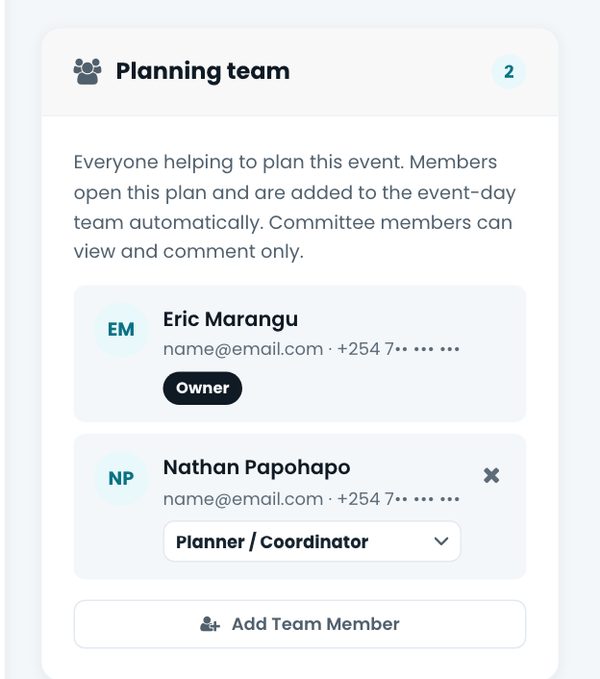
Invite your partner, family, committee or event planner to work from the same Event Plan. Give each person a role, keep decisions in one discussion, and let committee members view and comment without editing.

Couples Family committees Corporate teams Church committees School committees Planners and clients Harambee committees
Planning team card with an owner and a planner, and a team discussion

Needs your attention

Know what needs you first

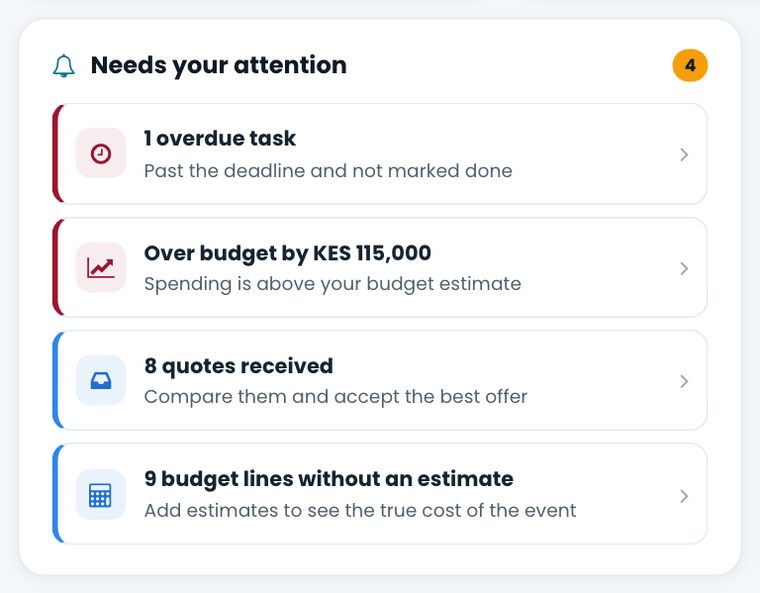
No more digging through spreadsheets and WhatsApp threads. Your Event Plan brings overdue tasks, spending above estimate, new quotes and missing estimates to the top.

Needs your attention: an overdue task, over budget, quotes received and budget lines without an estimate

Why organisers switch

From event-planning chaos to one plan

Without Papohapo

  • Conversations scattered across WhatsApp
  • Quotations in different formats
  • Forgotten tasks and deadlines
  • A budget spreadsheet nobody updates
  • Paper agreements
  • Unclear payment status
  • Separate guest lists and manual RSVPs
  • Last-minute seating and a crowded door

With Papohapo

  • One Event Plan for everything
  • Tasks and deadlines in one list
  • Budget you can see at a glance
  • Written quotes, compared side by side
  • Digital agreements, signed online
  • Payments tracked against each agreement
  • Event page, RSVPs and guest list together
  • Seating planner, door check-in and Event Day Centre

Service providers

Research providers before you engage

See the services they offer, their packages and prices, photos of their work, reviews and where they operate, then request a quote in one tap.

  • Browse 169 event services
  • Explore ready-made packages
  • Read provider profiles and reviews
  • Compare quotes before you choose
What "Papohapo Verified" meansVerified providers have passed Papohapo's identity checks: ID with a matching selfie, verified mobile number, M-Pesa name match and KRA PIN, with higher levels for registered businesses. Verification confirms who you're dealing with; it isn't a guarantee of service quality, so compare quotes and agree clear terms.
Provider profile showing verification, rating, counties served and portfolio
For event organisersKES 0to plan your event on Papohapo

Free for organisers

Planning your event is free

  • Create your Event Plan
  • Use every planning tool
  • Request and compare quotes
  • Publish your event page
  • Invite your planning team
  • Seat and check in your guests

You only pay the service providers you choose, on the terms in your signed agreement. Papohapo's fee is charged to service providers, not to you.

Explore the Event Plan

Everything you need. One Event Plan.

Event Plan header with progress, quick links and the overview

Your plan at a glance

Days to go, planning progress and your next step, with every area one click away.

  • Next-step guidance
  • Upcoming deadlines
  • Planning team and discussion
Budget and costs

Budget & costs

Estimates, confirmed costs and variance for every cost item.

  • Estimated vs confirmed
  • Over-budget warnings
  • Request quotes from any line
Service agreements

Quotes & agreements

Every request, quote and signed agreement with your providers in one list.

  • RFQ pipeline
  • Compare quotes
  • Signature progress
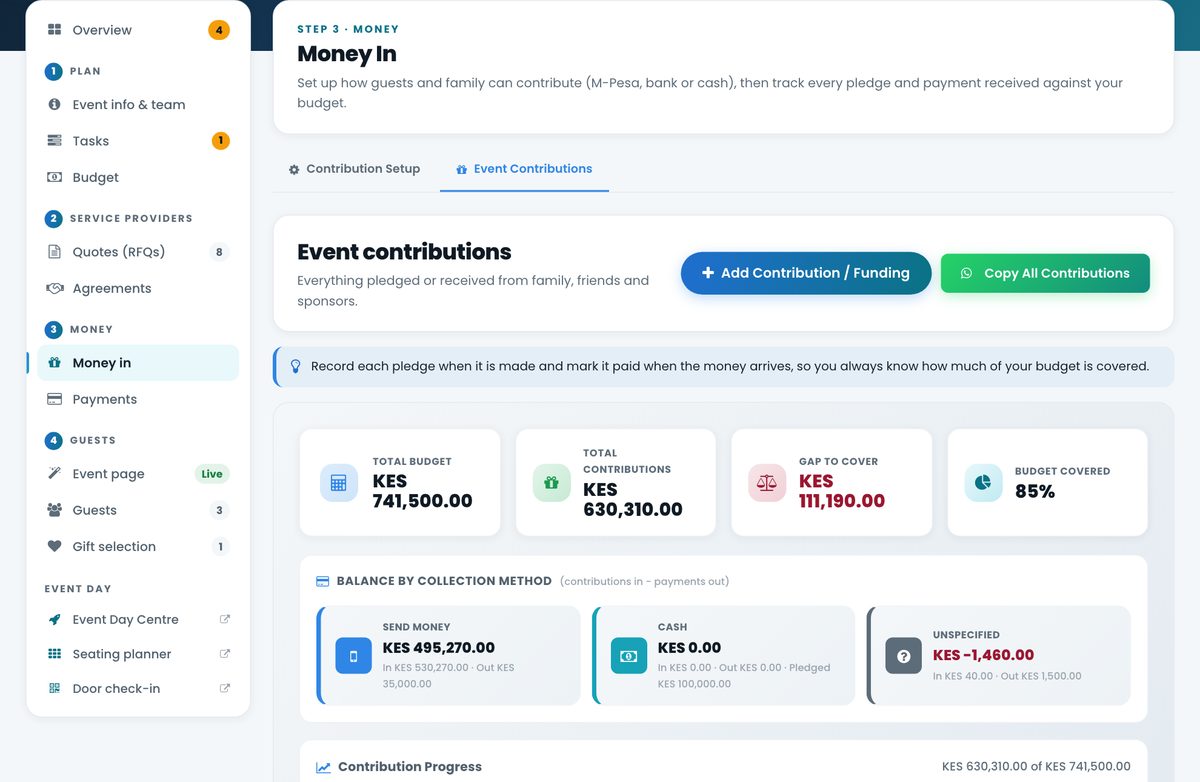
Money in: contributions, pledges and budget covered

Money in & payments

Track contributions and pledges coming in, and payments going out to providers.

  • Contributions and pledges
  • How much of the budget is covered
  • Payment schedules and balances
Guests

Guests & gifts

RSVPs, guest summary, gift selections and the event-day team.

  • RSVP status
  • Gift selections
  • Seating at a glance
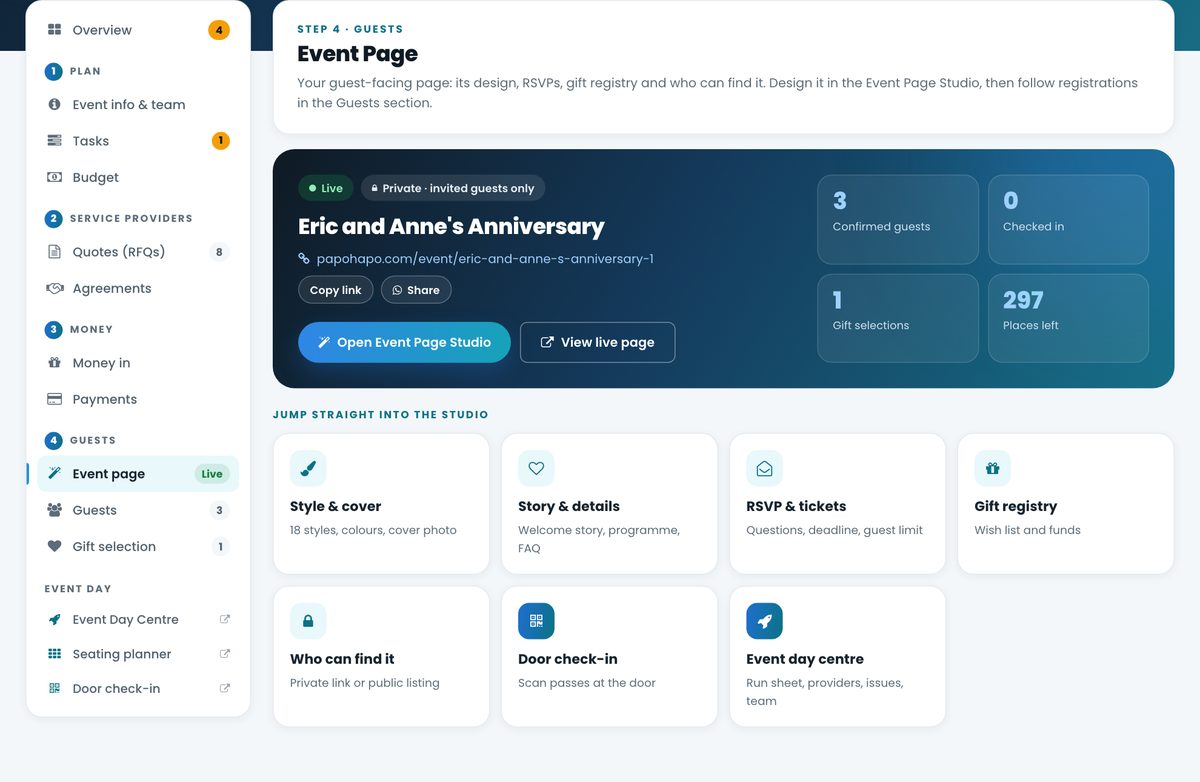
Event page summary with live status, confirmed guests and shortcuts into the studio

Your event page

Live status, confirmed guests and shortcuts straight into the studio.

  • Style, story, RSVP and gifts
  • Share by link or WhatsApp
  • Public or private
Seating Planner

Event day tools

Seating Planner, door check-in and the Event Day Centre, all linked to your guest list.

  • Tables and seats
  • QR check-in
  • Run sheet and team

For every occasion

Weddings, birthdays, harambees and everything between

Papohapo suggests the right tasks and services for your occasion when you create your event.

Alumni or Class ReunionAnniversaryAnnual General Meeting (AGM)Baby DedicationBaby ShowerBachelorette PartyBaptism or ChristeningBirthday PartyBridal ShowerChama MeetingCharity EventChildren's PartyChurch Service or CrusadeCommunity GatheringConcertConferenceCorporate EventCultural CelebrationDinner PartyEducation EventEid or Religious FestivalEnd-of-Year or Christmas PartyEngagement PartyExhibitionFamily ReunionFarewell or Send-off PartyFestivalFirst Communion or ConfirmationFuneralGala Dinner or Awards NightGender Reveal PartyGeneral EventGraduation PartyHarambee (Fundraiser)Homecoming CelebrationHousewarmingInitiation Ceremony (e.g., Circumcision, Coming-of-Age Rituals)Introduction Ceremony (e.g., Kwanjula)Kitchen PartyMemorial ServiceNaming or Dedication CeremonyNetworking EventNew Year's PartyOrdination or ConsecrationOther PartyPolitical Rally or Campaign EventProduct or Business LaunchProposal EventRetirement PartySchool EventSports Event or TournamentStag PartyTeam BuildingThanksgiving ServiceTraditional Naming CeremonyTraditional Wedding (e.g., Ruracio, Koito, Dowry Ceremonies)WeddingWedding Committee or Michango Meeting

Getting started

What happens after you sign up?

  1. Create your account

    Quick, free registration.

  2. Create your event

    Occasion, date, place and guests.

  3. Get your Event Plan

    Tasks and budget lines ready to fill in.

  4. Start planning

    Add estimates, tasks and your team.

  5. Find your providers

    Request quotes and compare them.

  6. Run your event

    Guests, seating, check-in and the day.

Create My Event — Free
  • Free for organisers
  • No card needed
  • Start in minutes

For professional planners

Planning events for clients?

Run every client event from its own Event Plan. Invite your client to the planning team, coordinate providers and keep budgets, agreements and payments transparent.

  • One plan per client event, with your client on the team
  • Quotes, agreements and payments in the open
  • Earn through the Planner Partner Programme
Contributions and pledges tracked in an Event Plan

Good questions

Questions organisers ask us

Still unsure about something? Our organiser help centre has step-by-step guides, or talk to our team.

Need a hand getting started?

Is Papohapo free for event organisers?

Yes. Creating your account and Event Plan, using the planning tools, publishing an event page and requesting quotes cost you nothing. You pay the service providers you choose, on the terms in your signed agreement. Papohapo's fee is charged to service providers.

What can I manage inside an Event Plan?

Your event details and planning team, tasks, budget, requests for quotation, service agreements, money coming in, payments to providers, your event page, guests, gift selections, seating, door check-in and the Event Day Centre.

Can I request quotes from service providers?

Yes. Request quotes from any cost item in your budget or from a service on Event Services. Your request reaches the providers who offer that service, and they reply with written quotes before your deadline. If you request a provider's package, the request goes straight to that provider.

Can I compare multiple quotes?

Yes. Quotes for the same request appear side by side so you can compare price and what's included, shortlist and accept the one you want.

Can I manage my event budget?

Yes. Add an estimate to each cost item, see confirmed costs from accepted quotes, follow what's paid and what's outstanding, and get a warning when spending goes above your estimate.

Can I invite other people to help plan?

Yes. Add people to your planning team by email and give them a role, such as planner, client, chair, treasurer or family. Committee members can view everything and comment without editing, and the team shares one discussion.

Can I create an event webpage?

Yes. Event Page Studio lets you choose a style and add your story, programme, photos, venue and directions, travel tips, FAQs, RSVP and gift registry. Share it publicly or as a private link for invited guests.

Can guests RSVP through the event page?

Yes. Guests RSVP on your event page, receive a QR entry pass and appear in the Guests area of your Event Plan straight away.

Can I create a gift registry?

Yes. Add gifts and cash funds to your registry. Guests reserve a gift or pledge a contribution on your event page, and each selection appears under Gift selection in your plan so you can follow up.

Can I manage seating?

Yes. The Seating Planner lets you set up areas and tables, drag guests to seats (or tap on a phone), auto-arrange guests so parties sit together, and print the chart. Seats then show at door check-in.

Can I check guests in at the door?

Yes. Your event-day team can scan guests' QR entry passes or find them by name or phone, check them in and see their table and seat.

Can I manage payments?

Yes. Each signed agreement brings its payment schedule into your plan. You approve and record payments as they fall due and can always see what's been paid and what remains for each provider.

What happens after I accept a provider's quote?

A service agreement is prepared from the quote with the services, dates and payment terms. You and the provider sign online, the payment schedule follows, and the provider joins your event-day vendor list.

Can professional event planners use Papohapo?

Yes. Planners run each client event in its own Event Plan with the client on the planning team, and can earn through the Planner Partner Programme.
Your event deserves more than a spreadsheet

Bring your plans, people, providers, guests and event-day details together in one place.

  • Free for organisers
  • No card needed
  • Start in minutes

Plan it. Organise it. Run it. Enjoy it.

Want the full picture? How Papohapo worksLooking for something to attend? Explore events